Request Reply
Camel supports the Request Reply from the EIP patterns .
When an application sends a message, how can it get a response from the receiver?
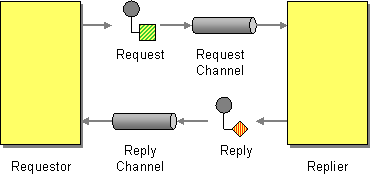
Send a pair of Request-Reply messages, each on its own channel.
Camel supports Request Reply by the
Exchange Pattern
on a
Message
which can be set to
InOut
to indicate a
request/reply message. Camel
Components
then
implement this pattern using the underlying transport or protocols.
For example, when using
JMS
with
InOut
the component will
by default perform these actions:
-
create by default a temporary inbound queue
-
set the
JMSReplyTodestination on the request message -
set the
JMSCorrelationIDon the request message -
send the request message
-
consume the response and associate the inbound message to the belonging request using the
JMSCorrelationID(as you may be performing many concurrent request/responses). -
continue routing when the reply is received and populated on the Exchange
| See the related Event Message . |
Using endpoint URI
If you are using a component which defaults to
InOnly
you can override
the
Exchange Pattern
for a
consumer
endpoint using
the pattern property.
foo:bar?exchangePattern=InOut
This is only possible on endpoints used by consumers (i.e., in
<from>
).
|
In the example below the message will be forced as a request reply message as the consumer
is in
InOut
mode.
-
Java
-
XML
-
YAML
from("jms:someQueue?exchangePattern=InOut")
  .to("bean:processMessage");
<route>
<from uri="jms:someQueue?exchangePattern=InOut"/>
<to uri="bean:processMessage"/>
</route>- route:
from:
uri: jms:someQueue
parameters:
exchangePattern: InOut
steps:
- to:
uri: bean:processMessageHow It Works
The
InOut
exchange pattern is a contract between the route and the component endpoint.
It tells the producer component that the caller expects a reply message.
The exchange pattern does
not
affect how EIPs and processors work within the route.
Processors such as
setBody
,
transform
,
process
, and
bean
always operate on the
current message regardless of the exchange pattern. The pattern only matters when the exchange
reaches a producer endpoint that acts on it.
Whether a component acts on the pattern depends on the component.
Components that support both modes, such as
JMS
,
SEDA
, and
AMQP
,
use
InOut
to switch to request/reply messaging.
For example, with JMS the component sets up a temporary reply queue
(via
JMSReplyTo
) and waits for a response.
Synchronous components such as
Direct
always process
in the same thread and call stack, so the pattern has no practical effect on the dispatch behavior.
Using setExchangePattern EIP
You can specify the
Exchange Pattern
using
setExchangePattern
in the DSL.
-
Java
-
XML
-
YAML
from("direct:foo")
  .setExchangePattern(ExchangePattern.InOut)
  .to("jms:queue:cheese");
<route>
<from uri="direct:foo"/>
<setExchangePattern pattern="InOut"/>
<to uri="jms:queue:cheese"/>
</route>- route:
from:
uri: direct:foo
steps:
- setExchangePattern:
pattern: InOut
- to:
uri: jms:queue:cheese
When using
setExchangePattern
then the
Exchange Pattern
on the
Exchange
is changed from this point onwards in the route.
This means you can change the pattern back again at a later point:
-
Java
-
XML
-
YAML
from("direct:foo")
  .setExchangePattern(ExchangePattern.InOnly)
  .to("jms:queue:one-way")
  .setExchangePattern(ExchangePattern.InOut)
  .to("jms:queue:in-and-out")
  .log("InOut MEP received ${body}");
<route>
<from uri="direct:foo"/>
<setExchangePattern pattern="InOnly"/>
<to uri="jms:queue:one-way"/>
<setExchangePattern pattern="InOut"/>
<to uri="jms:queue:in-and-out"/>
<log message="InOut MEP received ${body}"/>
</route>- route:
from:
uri: direct:foo
steps:
- setExchangePattern:
pattern: InOnly
- to:
uri: jms:queue:one-way
- setExchangePattern:
pattern: InOut
- to:
uri: jms:queue:in-and-out
- log:
message: "InOut MEP received ${body}"
Using
setExchangePattern
to change the
Exchange Pattern
is often only used in special use-cases where you must
force to be using either
InOnly
or
InOut
mode when using components that support both modes (such as messaging components like ActiveMQ, JMS, RabbitMQ etc.)
|
JMS component and InOnly vs. InOut
When consuming messages from
JMS
a Request Reply is
indicated by the presence of the
JMSReplyTo
header. This means the JMS component automatic
detects whether to use
InOnly
or
InOut
in the consumer.
Likewise, the JMS producer will check the current
Exchange Pattern
on the
Exchange
to know whether to use
InOnly
or
InOut
mode (i.e., one-way vs. request/reply messaging)