Poll
Camel supports the Content Enricher from the EIP patterns .
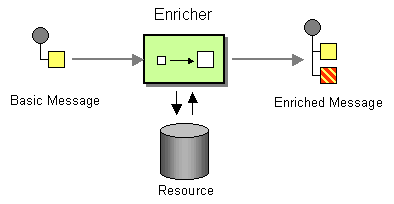
In Camel the Content Enricher can be done in several ways:
-
Using Enrich EIP, Poll Enrich , or Poll EIP
-
Using a Message Translator
-
Using a Processor with the enrichment programmed in Java
-
Using a Bean EIP with the enrichment programmed in Java
The Poll EIP is a simplified Poll Enrich which only supports:
-
Static Endpoints
-
No custom aggregation or other advanced features
-
Uses a 20 seconds timeout (default)
Options
The Poll eip supports the following options which are listed below.
| Name | Description | Default | Type |
|---|---|---|---|
|
note |
The note for this node. |
String |
|
|
description |
The description for this node. |
String |
|
|
disabled |
Whether to disable this EIP from the route during build time. Once an EIP has been disabled then it cannot be enabled later at runtime. |
false |
Boolean |
|
variableReceive |
To use a variable to store the received message body (only body, not headers). This makes it handy to use variables for user data and to easily control what data to use for sending and receiving. |
String |
|
|
uri |
Required The uri of the endpoint to poll a single message from. The result is stored in the original message body (or in a variable if variableReceive is set). |
String |
|
|
timeout |
Timeout in millis when polling from the external service. The default value is 20000 (20 seconds). |
20000 |
String |
Polling a message using Poll EIP
poll
uses a
Polling Consumer
to obtain the data.
It is usually used for
Event Message
messaging,
for instance, to read a file or download a file using FTP.
We have three methods when polling:
-
receive: Waits until a message is available and then returns it. Warning that this method could block indefinitely if no messages are available. -
receiveNoWait: Attempts to receive a message exchange immediately without waiting and returningnullif a message exchange is not available yet. -
receive(timeout): Attempts to receive a message exchange, waiting up to the given timeout to expire if a message is not yet available. Returns the message ornullif the timeout expired.
Timeout
By default, Camel will use the
receive(timeout)
which has a 20 seconds timeout.
You can pass in a timeout value that determines which method to use:
-
if timeout is
-1or other negative number thenreceiveis selected ( Important: thereceivemethod may block if there is no message) -
if timeout is
0thenreceiveNoWaitis selected -
otherwise,
receive(timeout)is selected
The timeout values are in milliseconds.
Using Poll
For example to download an FTP file:
-
Java
-
XML
-
YAML
from("direct:payload")
  .poll("ftp:myserver.com/myfolder?fileName=report-file.pdf");
<route>
<from uri="direct:payload"/>
<poll uri="ftp:myserver.com/myfolder?fileName=report-file.pdf"/>
</route>- route:
from:
uri: direct:payload
steps:
- poll:
uri: ftp:myserver.com/myfolder
parameters:
fileName: report-file.pdf| You can use dynamic values using the simple language in the uri, as shown below: |
-
Java
-
XML
-
YAML
from("direct:payload")
  .poll("ftp:myserver.com/myfolder?fileName=report-${header.id}.pdf");
<route>
<from uri="direct:payload"/>
<poll uri="ftp:myserver.com/myfolder?fileName=report-${header.id}.pdf"/>
</route>- route:
from:
uri: direct:payload
steps:
- poll:
uri: ftp:myserver.com/myfolder
parameters:
fileName: "report-${header.id}.pdf"Using Poll with Rest DSL
You can also use
poll
with
Rest DSL
to,
for example, download a file from
AWS S3
as the response of an API call.
-
Java
-
XML
-
YAML
rest("/report")
  .get("/{id}/payload")
    .to*("direct:payload");

from("direct:payload")
  .poll("aws-s3:xavier-dev?amazonS3Client=#s3client&deleteAfterRead=false&fileName=report-file.pdf")
<rest path="/report" desription="Report REST API">
<get path="/{id}/payload">
<to uri="direct:payload"/>
</get>
</rest>
<route>
<from uri="direct:payload"/>
<poll uri="aws-s3:xavier-dev?amazonS3Client=#s3client&deleteAfterRead=false&fileName=report-file.pdf"/>
</route>- rest:
path: /report
get:
- path: /{id}/payload
to:
uri: direct:payload
- route:
from:
uri: direct:payload
steps:
- poll:
uri: aws-s3:xavier-dev
parameters:
amazonS3Client: "#s3client"
deleteAfterRead: false
fileName: report-file.pdfUsing Poll with file based components
When using
poll
or
pollEnrich
with the file based components, then the
eagerLimitMaxMessagesPerPoll
option
has changed default from
false
to
true
from
Camel 4.13
onwards. Only use-cases where you need to sort the files first,
requires to explicit set the option
eagerLimitMaxMessagesPerPoll=false
to make Camel scan for all files first before sorting,
and then
poll
or
pollEnrich
will then pick the top file after the sorting.
This improves performance for use-cases without need for sorting first.