Recipient List
Camel supports the Recipient List from the EIP patterns .
How do we route a message to a list of dynamically specified recipients?
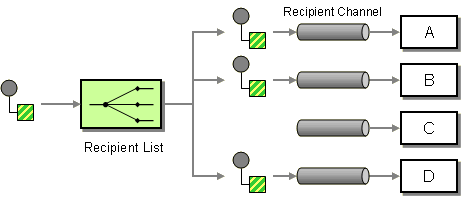
Define a channel for each recipient. Then use a Recipient List to inspect an incoming message, determine the list of desired recipients, and forward the message to all channels associated with the recipients in the list.
Options
The Recipient List eip supports the following options which are listed below.
| Name | Description | Default | Type |
|---|---|---|---|
|
note |
The note for this node. |
String |
|
|
description |
The description for this node. |
String |
|
|
disabled |
Whether to disable this EIP from the route during build time. Once an EIP has been disabled then it cannot be enabled later at runtime. |
false |
Boolean |
|
expression |
Required The expression to compute the list of recipient endpoint URIs. The result can be a comma-separated string, a Collection, or an Iterator of endpoint URIs. |
ExpressionDefinition |
|
|
delimiter |
Delimiter used if the Expression returned multiple endpoints. Can be turned off using the value false. |
, |
String |
|
aggregationStrategy |
Sets the AggregationStrategy to be used to assemble the replies from the recipients, into a single outgoing message. |
AggregationStrategy |
|
|
aggregationStrategyMethodName |
This option can be used to explicitly declare the method name to use, when using POJOs as the AggregationStrategy. |
String |
|
|
aggregationStrategyMethodAllowNull |
If this option is false then the aggregate method is not used if there was no data to enrich. If this option is true then null values is used as the oldExchange (when no data to enrich), when using POJOs as the AggregationStrategy. |
false |
Boolean |
|
parallelAggregate |
Deprecated If enabled then the aggregate method on AggregationStrategy can be called concurrently. Notice that this would require the implementation of AggregationStrategy to be implemented as thread-safe. By default this is false meaning that Camel synchronizes the call to the aggregate method. Though in some use-cases this can be used to archive higher performance when the AggregationStrategy is implemented as thread-safe. |
false |
Boolean |
|
parallelProcessing |
If enabled then sending messages to the recipients occurs concurrently. Note the caller thread will still wait until all messages has been fully processed, before it continues. |
false |
Boolean |
|
synchronous |
Sets whether synchronous processing should be strictly used. When enabled then the same thread is used to continue routing after the recipient list is complete, even if parallel processing is enabled. |
false |
Boolean |
|
timeout |
Sets a total timeout specified in millis, when using parallel processing. If the Recipient List hasn’t been able to send and process all replies within the given timeframe, then the timeout triggers and the Recipient List breaks out and continues. |
0 |
String |
|
executorService |
Refers to a custom Thread Pool to be used for parallel processing. Notice if you set this option, then parallel processing is automatically implied, and you do not have to enable that option as well. |
ExecutorService |
|
|
stopOnException |
Stops further processing if an exception or failure occurred during processing of an exchange and the caused exception will be thrown. |
false |
Boolean |
|
ignoreInvalidEndpoints |
Whether to ignore an invalid endpoint URI when trying to create a producer with that endpoint. |
false |
Boolean |
|
streaming |
If enabled then Camel will process replies out-of-order, eg in the order they come back. If disabled, Camel will process replies in the same order as defined by the recipient list. |
false |
Boolean |
|
onPrepare |
Uses the Processor when preparing the exchange to be sent. This can be used to deep-clone messages that should be sent, or any custom logic needed before the exchange is sent. |
Processor |
|
|
cacheSize |
Sets the maximum size used by the ProducerCache which is used to cache and reuse producers when uris are reused. Use 0 for default cache size, or -1 to turn cache off. |
Integer |
|
|
shareUnitOfWork |
Shares the UnitOfWork with the parent and each of the sub messages. Recipient List will by default not share unit of work between the parent exchange and each recipient exchange. This means each sub exchange has its own individual unit of work. |
false |
Boolean |
|
allowedSchemes |
Sets an optional comma-separated allow-list of component schemes that the dynamic recipient may resolve to (e.g. http,https). When set, a dynamic endpoint whose scheme is not in the list is rejected. This is a defence-in-depth restriction, useful for low-code / Kamelet deployments; by default (unset) any scheme is allowed. |
String |
See the
cacheSize
option for more details on
how much cache
to use depending on how many or few unique endpoints are used.
|
Exchange properties
The Recipient List eip supports the following exchange properties which are listed below.
The exchange properties are set on the
Exchange
by the EIP, unless otherwise specified in the description.
This means those properties are available after this EIP has completed processing the
Exchange
.
| Name | Description | Default | Type |
|---|---|---|---|
|
CamelRecipientListEndpoint |
The endpoint uri of this recipient list. |
String |
|
|
CamelToEndpoint |
Endpoint URI where this Exchange is being sent to. |
String |
Using Recipient List
The Recipient List EIP allows routing the same message to a number of endpoints and process them in a different way.
There can be one or more destinations, and Camel will execute them sequentially (by default). However, a parallel mode exists which allows processing messages concurrently.
The Recipient List EIP has many features and is based on the Multicast EIP. For example, the Recipient List EIP is capable of aggregating each message into a single response message as the result after the Recipient List EIP.
Using Static Recipient List
The following example shows how to route a request from an input
queue:a
endpoint
to a static list of destinations, using
constant
:
-
Java
-
XML
-
YAML
from("jms:queue:a")
    .recipientList(constant("seda:x,seda:y,seda:z"));
<route>
<from uri="jms:queue:a"/>
<recipientList>
<constant>seda:x,seda:y,seda:z</constant>
</recipientList>
</route>- route:
from:
uri: jms:queue:a
steps:
- recipientList:
expression:
constant:
expression: "seda:x,seda:y,seda:z"Using Dynamic Recipient List
Usually one of the main reasons for using the Recipient List pattern is that the list of recipients is dynamic and calculated at runtime.
The following example demonstrates how to create a dynamic recipient list using an
Expression
(which in this case extracts a named header value dynamically) to calculate the list of endpoints; which are either
of type
Endpoint
or are converted to a
String
and then resolved using the endpoint URIs (separated by comma).
-
Java
-
XML
-
YAML
from("jms:queue:a")
    .recipientList(header("foo"));
<route>
<from uri="jms:queue:a"/>
<recipientList>
<header>foo</header>
</recipientList>
</route>- route:
from:
uri: jms:queue:a
steps:
- recipientList:
expression:
header:
expression: fooHow is dynamic destinations evaluated
The dynamic list of recipients that are defined in the header must be iterable such as:
-
java.util.Collection -
java.util.Iterator -
arrays
-
org.w3c.dom.NodeList -
a single
Stringwith values separated by comma (the delimiter configured) -
any other type will be regarded as a single value
Configuring delimiter for dynamic destinations
In XML DSL you can set the delimiter attribute for setting a delimiter to be used if the header value is a single
String
with multiple separated endpoints.
By default, Camel uses comma as delimiter, but this option lets you specify a custom delimiter to use instead.
<route>
  <from uri="direct:a"/>
  <!-- use semicolon as a delimiter for String-based values -->
  <recipientList delimiter=";">
    <header>myHeader</header>
  </recipientList>
</route>
And in YAML DSL you set the
delimiter
parameter:
- route:
    from:
      uri: direct:a
      steps:
        - recipientList:
            delimiter: ";"
            expression:
              header:
                expression: myHeader
So if
myHeader
contains a
String
with the value
"activemq:queue:foo;activemq:topic:hello ; log:bar"
then Camel will split the
String
using the delimiter given in the XML that was comma,
resulting into three endpoints to send to.
You can use spaces between the endpoints as Camel will trim the value when it looks up the endpoint to send to.
In Java DSL, you specify the delimiter as second parameter as shown below:
from("direct:a")
    .recipientList(header("myHeader"), ";");
Using parallel processing
The Recipient List supports
parallelProcessing
similar to what
Multicast
and
Split
EIPs have as well.
When using parallel processing, then a thread pool is used to have concurrent tasks sending the
Exchange
to multiple recipients concurrently.
You can enable parallel mode using
parallelProcessing
as shown:
-
Java
-
XML
-
YAML
from("direct:a")
    .recipientList(header("myHeader")).parallelProcessing();
<route>
<from uri="direct:a"/>
<recipientList parallelProcessing="true">
<header>myHeader</header>
</recipientList>
</route>- route:
from:
uri: direct:a
steps:
- recipientList:
parallelProcessing: "true"
expression:
header:
expression: myHeader|
When parallel processing is enabled, then the Camel routing engin will continue processing using last used thread from the parallel thread pool. However, if you want to use the original thread that called the recipient list, then make sure to enable the synchronous option as well. |
Using custom thread pool
A thread pool is only used for
parallelProcessing
. You supply your own custom thread pool via the
ExecutorServiceStrategy
(see Camel’s Threading Model),
the same way you would do it for the
aggregationStrategy
. By default, Camel uses a thread pool with 10 threads (subject to change in future versions).
The Recipient List EIP will by default continue to process the entire exchange even in case one of the sub messages will throw an exception during routing.
For example, if you want to route to three destinations and the second
destination fails by an exception. What Camel does by default is to
process the remainder destinations. You have the chance to deal with the exception
when aggregating using an
AggregationStrategy
.
But sometimes you want the Camel to stop and let the exception be
propagated back, and let the Camel
Error Handler
handle it. You can do this by specifying that it should stop in case of an
exception occurred. This is done by the
stopOnException
option as
shown below:
-
Java
-
XML
-
YAML
from("direct:start")
    .recipientList(header("whereTo")).stopOnException()
    .to("mock:result");

    from("direct:foo").to("mock:foo");

    from("direct:bar").process(new MyProcessor()).to("mock:bar");

    from("direct:baz").to("mock:baz");
<routes>
<route>
<from uri="direct:start"/>
<recipientList stopOnException="true">
<header>whereTo</header>
</recipientList>
<to uri="mock:result"/>
</route>
<route>
<from uri="direct:foo"/>
<to uri="mock:foo"/>
</route>
<route>
<from uri="direct:bar"/>
<process ref="myProcessor"/>
<to uri="mock:bar"/>
</route>
<route>
<from uri="direct:baz"/>
<to uri="mock:baz"/>
</route>
</routes>- route:
from:
uri: direct:start
steps:
- recipientList:
stopOnException: "true"
expression:
header:
expression: whereTo
- to:
uri: mock:result
- route:
from:
uri: direct:foo
steps:
- to:
uri: mock:foo
- route:
from:
uri: direct:bar
steps:
- process:
ref: myProcessor
- to:
uri: mock:bar
- route:
from:
uri: direct:baz
steps:
- to:
uri: mock:baz
In this example suppose a message is sent with the header
whereTo=direct:foo,direct:bar,direct:baz
that means the recipient list sends messages to those three endpoints.
Now suppose that the
MyProcessor
is causing a failure and throws an exception.
This means the Recipient List EIP will stop after this, and not the last route (
direct:baz
).
Ignore invalid endpoints
The Recipient List supports
ignoreInvalidEndpoints
(like
Routing Slip
EIP).
You can use it to skip endpoints which are invalid.
-
Java
-
XML
-
YAML
from("direct:a")
    .recipientList(header("myHeader")).ignoreInvalidEndpoints();
<route>
<from uri="direct:a"/>
<recipientList ignoreInvalidEndpoints="true">
<header>myHeader</header>
</recipientList>
</route>- route:
from:
uri: direct:a
steps:
- recipientList:
ignoreInvalidEndpoints: "true"
expression:
header:
expression: myHeader
Then let us say the
myHeader
contains the following two endpoints
direct:foo,xxx:bar
.
The first endpoint is valid and works. However, the second one is invalid and will just be ignored.
Camel logs at DEBUG level about it, so you can see why the endpoint was invalid.
Using timeout
If you use
parallelProcessing
then you can configure a total
timeout
value in millis.
Camel will then process the messages in parallel until the timeout is hit. This allows you to continue processing if one message consumer is slow. For example, you can set a timeout value of 20 sec.
|
Tasks may keep running
If the timeout is reached with running tasks still remaining, certain tasks for which it is challenging for Camel to shut down in a graceful manner may continue to run. So use this option with a bit of care. |
For example, in the unit test below, you can see that we multicast the message to three destinations. We have a timeout of 2 seconds, which means only the last two messages can be completed within the timeframe. This means we will only aggregate the last two which yields a result aggregation which outputs "BC".
from("direct:start")
    .multicast(new AggregationStrategy() {
            public Exchange aggregate(Exchange oldExchange, Exchange newExchange) {
                if (oldExchange == null) {
                    return newExchange;
                }

                String body = oldExchange.getIn().getBody(String.class);
                oldExchange.getIn().setBody(body + newExchange.getIn().getBody(String.class));
                return oldExchange;
            }
        })
        .parallelProcessing().timeout(250).to("direct:a", "direct:b", "direct:c")
    // use end to indicate end of multicast route
    .end()
    .to("mock:result");

from("direct:a").delay(1000).to("mock:A").setBody(constant("A"));

from("direct:b").to("mock:B").setBody(constant("B"));

from("direct:c").to("mock:C").setBody(constant("C"));
By default, if a timeout occurs the
AggregationStrategy
is not invoked. However, you can implement the
timeout
method:
This allows you to deal with the timeout in the
AggregationStrategy
if you really need to.
|
Timeout is total
The timeout is total, which means that after X time, Camel will aggregate the messages which have completed within the timeframe.
The remainder will be canceled. Camel will also only invoke the
|
Using ExchangePattern in recipients
The recipient list will by default use the current Exchange Pattern. Though one can imagine use-cases where one wants to send
a message to a recipient using a different exchange pattern. For example, you may have a route that initiates as an
InOnly
route,
but want to use
InOut
exchange pattern with a recipient list. You can configure the exchange pattern directly in the
recipient endpoints.
For example, in the route below we pick up new files (which will be started as
InOnly
) and then route to a recipient list.
As we want to use
InOut
with the ActiveMQ (JMS) endpoint we can now specify this using the
exchangePattern=InOut
option.
Then the response from the JMS request/reply will then be continued routed, and thus the response is what will be stored
in as a file in the outbox directory.
-
Java
-
XML
-
YAML
from("file:inbox")
    // the exchange pattern is InOnly initially when using a file route
    .recipientList().constant("activemq:queue:inbox?exchangePattern=InOut")
    .to("file:outbox");
<route>
<from uri="file:inbox"/>
<recipientList>
<constant>activemq:queue:inbox?exchangePattern=InOut</constant>
</recipientList>
<to uri="file:outbox"/>
</route>- route:
from:
uri: file:inbox
steps:
- recipientList:
expression:
constant:
expression: activemq:queue:inbox?exchangePattern=InOut
- to:
uri: file:outbox|
The recipient list will not alter the original exchange pattern. So in the example above the exchange pattern will still
be
See more details at Event Message and Request Reply EIPs. |