Event Message
Camel supports the Event Message from the EIP patterns .
How can messaging be used to transmit events from one application to another?
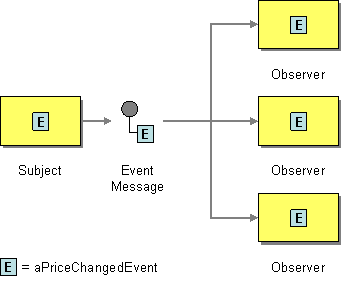
Use an Event Message for reliable, asynchronous event notification between applications.
Camel supports Event Message by the
Exchange Pattern
on a
Message
which can be set to
InOnly
to
indicate
a oneway event message. Camel
Components
then
implement this pattern using the underlying
transport or protocols.
The default behaviour of many
Components
is
InOnly
such as for
JMS
,
File
or
SEDA
.
Some components support both
InOnly
and
InOut
and act accordingly.
For example, the
JMS
can send messages as one-way
(
InOnly
) or use request/reply
messaging (
InOut
).
| See the related Request Reply message. |
Using endpoint URI
If you are using a component which defaults to
InOut
you can override
the
Exchange Pattern
for a
consumer
endpoint using
the pattern property.
foo:bar?exchangePattern=InOnly
This is only possible on endpoints used
by consumers (i.e., in
<from>
).
|
In the example below the message will be forced
as an event message as the consumer
is in
InOnly
mode.
-
Java
-
XML
from("mq:someQueue?exchangePattern=InOnly")
  .to("activemq:queue:one-way");
<route>
<from uri="mq:someQueue?exchangePattern=InOnly"/>
<to uri="activemq:queue:one-way"/>
</route>
Using
setExchangePattern
EIP
You can specify the
Exchange Pattern
using
setExchangePattern
in the DSL.
-
Java
-
XML
from("mq:someQueue")
  .setExchangePattern(ExchangePattern.InOnly)
  .to("activemq:queue:one-way");
<route>
<from uri="mq:someQueue"/>
<setExchangePattern pattern="InOnly"/>
<to uri="activemq:queue:one-way"/>
</route>
When using
setExchangePattern
then
the
Exchange Pattern
on the
Exchange
is
changed from this point onwards in the route.
This means you can change the pattern back again at a later point:
from("mq:someQueue")
  .setExchangePattern(ExchangePattern.InOnly)
  .to("activemq:queue:one-way");
  .setExchangePattern(ExchangePattern.InOut)
  .to("activemq:queue:in-and-out")
  .log("InOut MEP received ${body}")
Using
setExchangePattern
to
change the
Exchange
Pattern
is often only used in special use-cases
where you must
force to be using either
InOnly
or
InOut
mode when using
components that support both modes (such
as messaging components like ActiveMQ,
JMS, RabbitMQ etc.)
|
JMS component and InOnly vs. InOut
When consuming messages from
JMS
a Request Reply is
indicated by the presence of the
JMSReplyTo
header. This means the JMS component automatic
detects whether to use
InOnly
or
InOut
in the consumer.
Likewise, the JMS producer will check the
current
Exchange Pattern
on the
Exchange
to know
whether to use
InOnly
or
InOut
mode (i.e., one-way vs. request/reply messaging)
Other Implementation Details
There are concrete classes that implement the
Message
interface for each
Camel-supported communications technology. For
example, the
JmsMessage
class
provides a JMS-specific implementation of the
Message
interface. The public API
of the
Message
interface provides
getters and setters methods to access the
message
id
,
body
and individual
header
fields of a message.